Expressions present a powerful tool to derive values from product data. It is useful to create SEO optimized titles and descriptions, as well as derive arbitrary attributes like tax-included prices, tax, shipping, etc.
Expressions compose of tokens (variables that represents context data that is being pulled into the feed like variant price, options, etc), constants (texts, numbers), operators (math operators, string concatenation), function (text case manipulation, date calculation, etc.) and self expressive keywords like "if", "then", "else".
An expression may include one or more tokens. Each token must be enclosed in single quotes '', for example: '{price}', '{product_title}'. The full list of available tokens is provided at the end of this document.
Some examples where expressions can be used:
A custom field representing tax that equal to 21% of product price.
A "Shipping and included" price that equal product price added with a shipping fee for a marketplace that take only shipping and tax included prices.
A condition to include or exclude variant from feed based on its metafield and/or other data
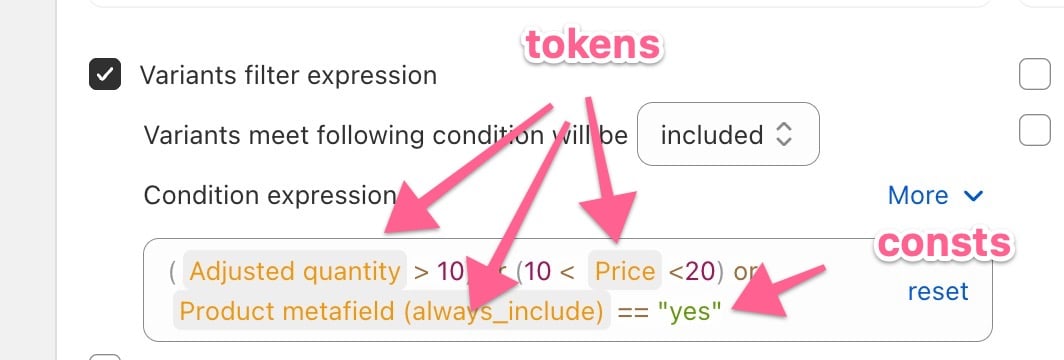
Following screenshot is showing a condition that match when one of following conditions are met:
quantity > 10
price between 10 and 20
has a product metafield with namespace "my_fields" and key "always_include" which has value "yes"
The raw expression would be: (
Tokens and constants are returning values which can be of the following types:
Scalar
A single value which can be a number or text. Constant texts are always inside double quotes.
"1" + 2 = "12"
1 + 2 = 3
Object
A complex item that is composed of attributes. For example a variant object could have title, price and quantity attributes among others
{
title: "Red Small",
price: 20,
inventoryQuantity: 2
}
List
A list (array) of items.
List of scalar items. Tokens of this type have titles end with "list" e.g: '{tags:}' (Tag list), '{collection_titles}' (Collection title list), '{gallery_images}' (Gallery image list), etc.
List of object items. Tokens of this type and their titles end with "objects": '{variant_objects}' (Variant objects), '{variant_image_objects}' (Variant image objects), etc.
Understanding the types of value will let us correctly use the operators and functions to compose expressions. Some operators only work with specific value types. Some behave differently on different operands' types.
"sale" in '{tags:}' |
|
map('{variant_objects}', "title") |
|
"1" + 2 = "12" 1 + 2 = 3 |
|
Use feed preview extensively to make sure that the expressions are working properly.
Editing expression is made easier with some help of the expression editor.
To hide complexity, an expression can be in read-only mode, showing a general description of the expression underneath. Click on 'Edit' button to reveal the expression and edit it.
A token can be added by typing the single quote ('), supported tokens will be listed in a contextual dropdown and one needs to be selected from the list to be added into the expression box. Added tokens have a greyed background and can be changed by clicking on it.
Depending on context, typing the double quote (") may display a list of applicable constants in a dropdown. Added constants will have a greyed background, but with a green color instead of orange like the tokens.
A good example is editing the Google product category. The list includes thousands of categories, so the dropdown is helpful to select the right category.
In the following screenshot, the URL is composed of joining a string and the product handle

Regular expression is really powerful (and complicated) way to check for patterns in string values. Examples include:
If Product description include one of the following words: "shirt", "jean", "child" or "women":
'{product_description}' ~= "(shirt|jean|child|women)"
If Product tile starts with "Men" or "Boy". This does not include titles that have the word men somewhere else in the sentence:
'{product_title}' ~= "(^men|^boy)" will match "Men's wear" and "Boy's jeans" but not "T-shirt for men"
Following screenshot is showing an expression derive a tax-included price value from the value of product type.
If the product is clothing then the price should include a 10% rise for tax
if it's is kitchen ware or household then the tax included is 20%
otherwise the price stay the same

Sometime you may need to specify shipping cost for product according to its price and/or weight
Following is an expression for
If price > 100 shipping is free
if 50 < price < 100 shipping is 10% of price
if price < 50 then shipping is 5

Some attributes expect a list of values will have this icon next to their names, , including the product details, product highlights, additional images and promotion ID. Expressions for these attributes should return one of the following forms:
1/ An array in the form of ("value1","value2","value3")
2/ A metafield that contains a list of values. For example additional images could be provided by a metafield that returns a list of files.
3/ (deprecated) A string, which then be processed as below:
- for product details and product highlights, the string will be split into lines and the list of lines will then be used as the list of values. If the content (highlights, details) needs to be in multi-line, use an array as option 1 above.
- for additional images and promotion ID, the string will be split by commas (,)
Option 3 also includes support of text metafields (single line and multi line), whose values will be processed accordingly.
Product detail entries
Product details is a special list which include entries, each composed of section name (optional), attribute name (optional) and attribute value seperated by colons.
Section name (optional):Attribute name (optional):Attribute value
If there is only one element, it would be used as the Attribute value. Attribute name will take the default value of "Detail 1", "Detail 2", etc. For more meaningful attribute names, add them in before the value and separate them with colons
Display:4k
Vendor:Samsung
If the value has to include colons itself, wrap it in quotes
General:Display:"color: green"
Multiple details can be added each on a line. Multiple details would help enrich your product data for better performance. Use a multi-line metafield to store multiple details.
Some attributes expect money amount with currency. For example cost of good sold. The expression should return BOTH the amount and the currency, e.g "12USD" or "3 GBP".
These attributes expect a value and a unit. For example unit pricing measure and unit pricing base measure. The expression should return BOTH the value and the unit, e.g. "1.3kg" or "12 floz".
These attributes accept yes/no values. The expression should be either a logic expression, or an expression that return "yes" or "no".
Example of a logic expression
Price > 10 or Quantity < 3
The same logic expression re-written to return "yes"/"no"
if '{price}' > 0 or Quantity < 3 then "yes" else "no"
Metafields play important role in storing custom data for Shopify products and variants. Use of metafields in expression allow endless customization for feed attributes. Metaobjects is a special type of metafields that can store structured data. Each metaobject is referenced as a metafield, and composes of fields. Fields can be simple data (text) or even another metaobject, allowing the structure to be nested.
A metafield are often identified with its namespace and key, joining with a dot (.). Example: mm-google-shopping.age_group refers to metafield namespace mm-google-shopping and key age_group.
Metafields are presented in expression as tokens, composed of namespace, key and some metadata that allow the app to properly retrieve the value of the metafield.
Metafields can be added into expressions using several ways:
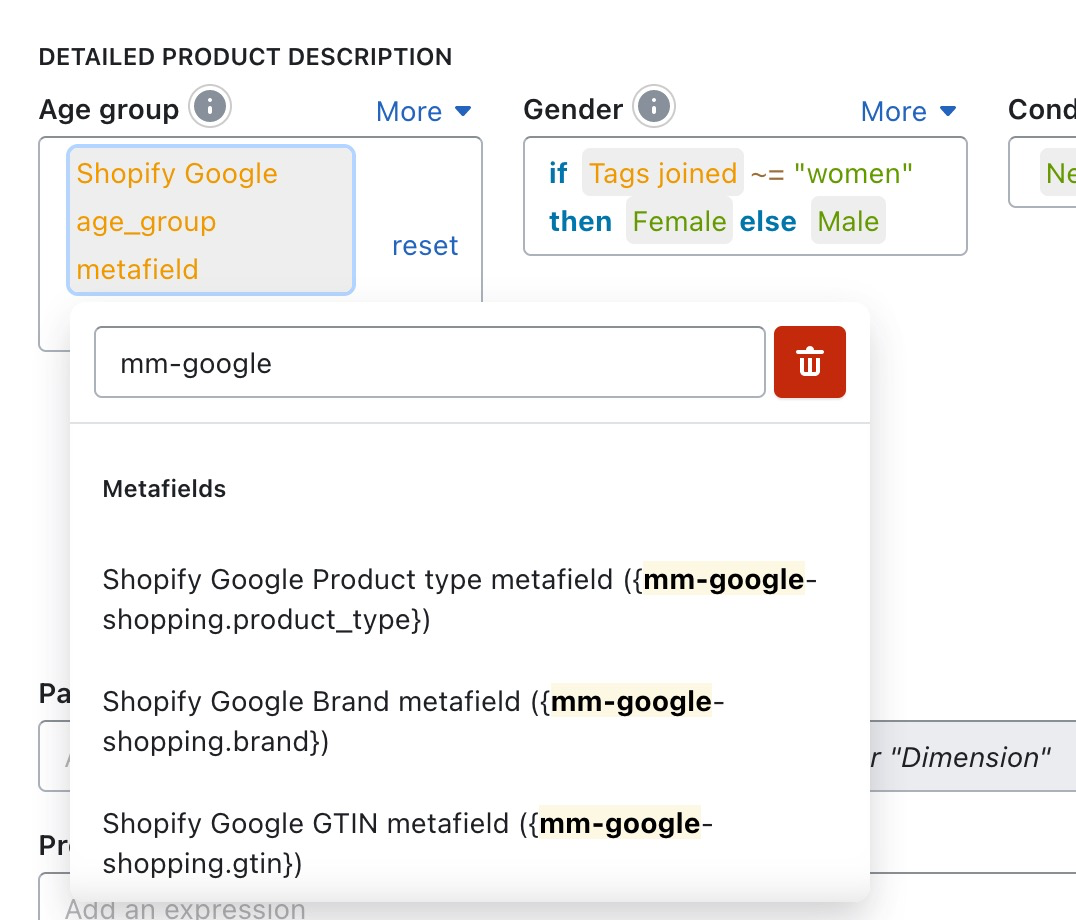
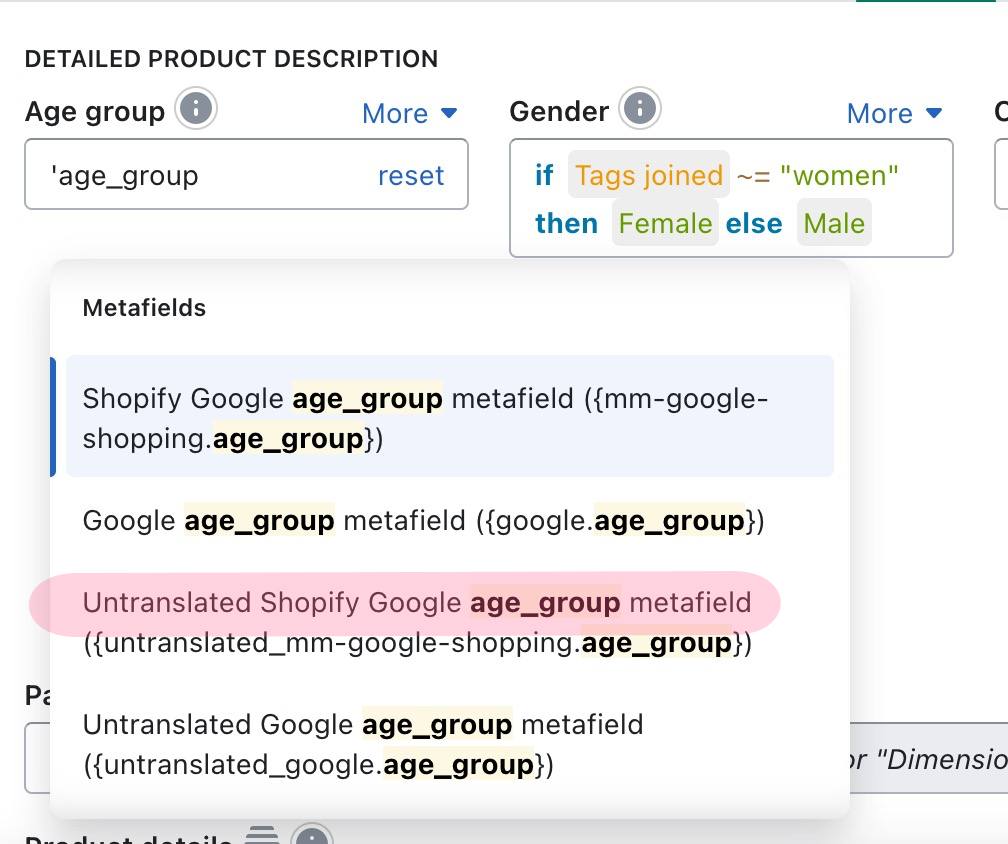
"De-factor" metafields including the Google Shopping metafields. For example mm-google-shopping.age_group. The Google Shopping metafields are supported by Shopify import/export utility to add product with Google Shopping attributes. "De-factor" metafields are listed in the contextual menu in the expression editor, and can be access by typing in the editor
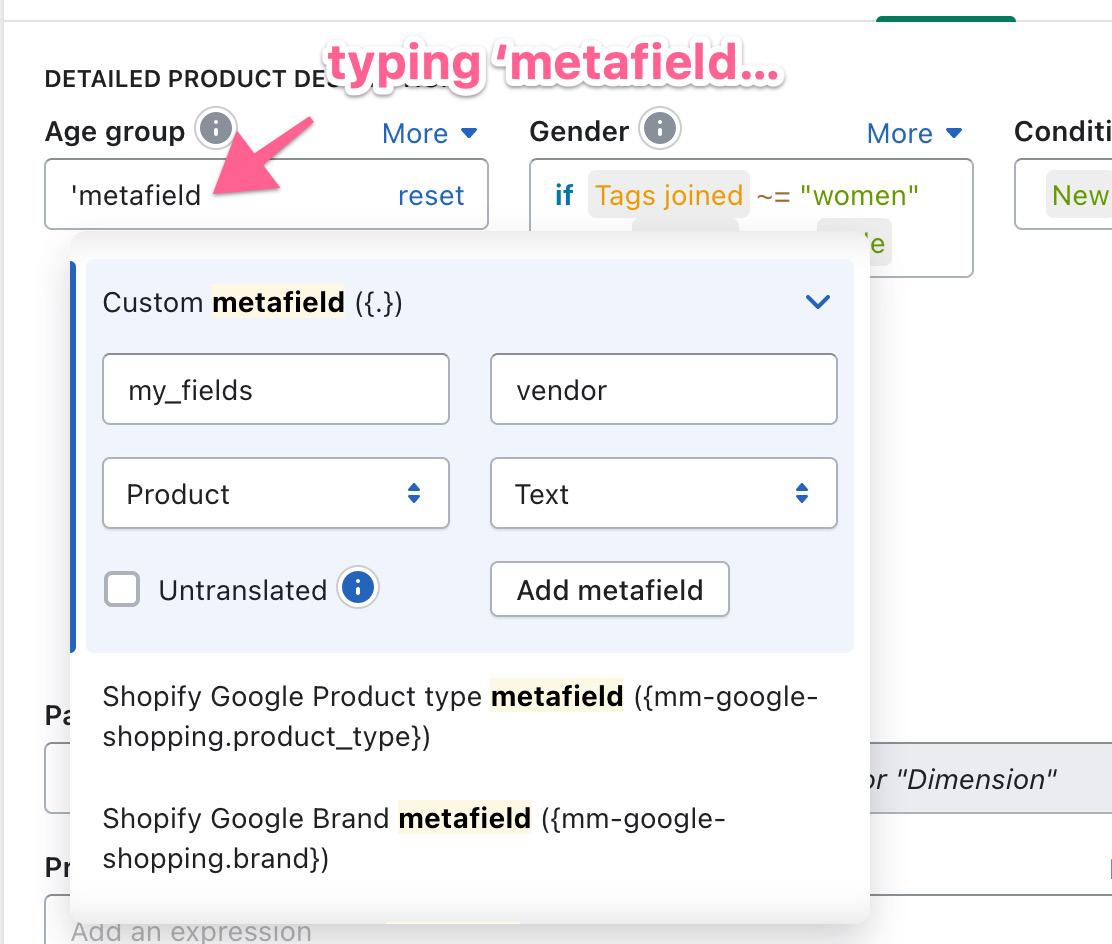
Custom metafield can be added with the metafield form, which can be open from the expression editor by typing in the text 'metafield. Do note that the single quote is the "magic" search trigger for all the tokens in expression
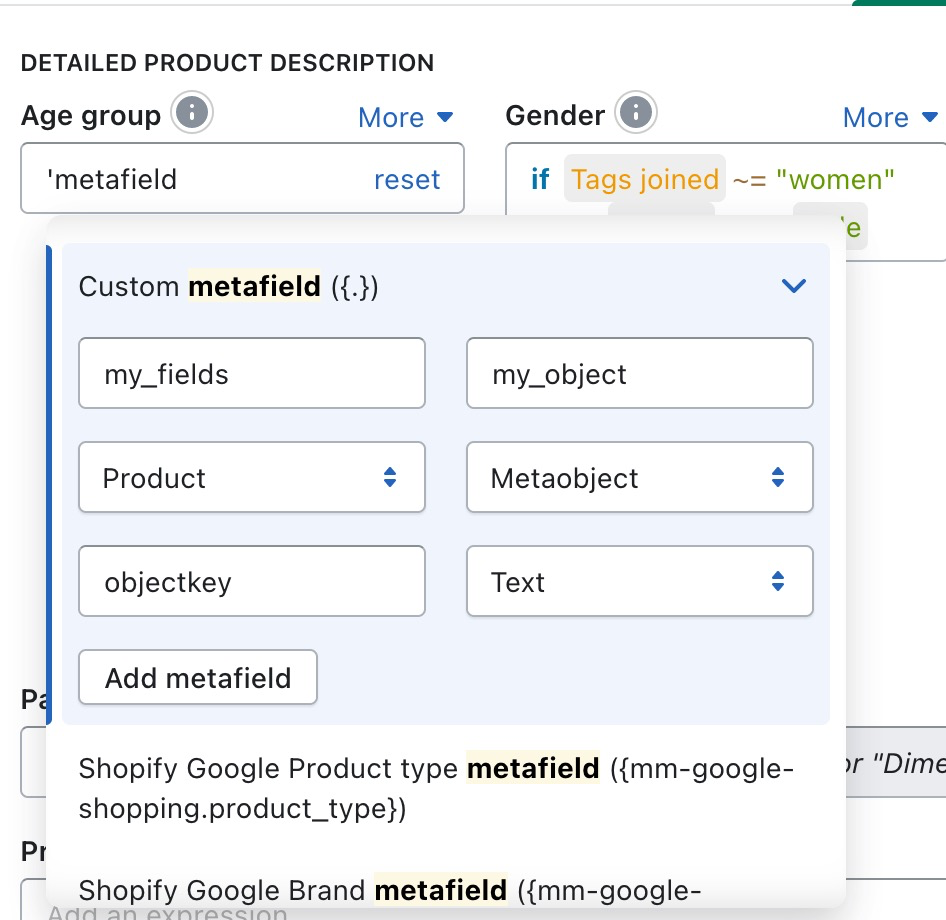
Supported metafield owner types include Product and Variant, which can be selected in the metafield form. Metafield can be of type text, image, image list, JSON or a metaobject. Metaobjects can be nested as many level as needed
By default the translatable metafields will be translated into the selected feed language. In the metafield form, check the "Untranslated" to skip translation, which might be desired for metafields that store enumerated fields like [age_group], [gender]. The drop down list of "de-factor" metafields also support "Untranslated" versions of corresponding metafields.
There are 2 basic types of consts: numbers and strings. Numbers may be floating point or integers. Strings should always be double-quoted. Types get automatically converted when possible, for example:
"1" + 2 == "12"
"12" - 1 == 11
"12" * 1 == 12
Values Description | |
43, -1.234 | Numbers |
"hello" | String |
" \" \\ " | Escaping of double-quotes and blackslash in string |
BEWARE!
Strings must be double-quoted! Single quotes are for tokens.
Numeric arithmetic Description | |
x + y | Add |
x - y | Subtract |
x * y | Multiply |
x / y | Divide |
x ^ y | Power |
x mod y | Modulo |
BEWARE! Modulo always returns a positive number: -1 mod 3 == 2 .
Comparisons Description | |
x == y | Equals |
x != y | Does not equal |
x < y | Less than |
x <= y | Less than or equal to |
x > y | Greater than |
x >= y | Greater than or equal to |
x == y <= z | Chained relation, equivalent to (x == y and y <= z) |
x ~= y | Regular expression match |
x in (a, b, c) | Equivalent to (x == a or x == b or x == c) |
x not in (a, b, c) | Equivalent to (x != a and x != b and x != c) |
Boolean logic Description | |
x or y | Boolean or |
x and y | Boolean and |
not x | Boolean not |
if x then y else z | If boolean x is true, return value y, else return z |
( x ) | Explicit operator precedence |
Objects and arrays Description | |
(a, b, c) | Array |
a in b | Array a is a subset of array b |
x of y | Property x of object y |
Functions Description | |
abs(x) | Absolute value |
ceil(x) | Round floating point up |
empty(x) | True if x is |
exists(x) | True unless x is |
floor(x) | Round floating point down |
log(x) | Natural logarithm |
log2(x) | Logarithm base two |
log10(x) | Logarithm base ten |
max(a, b, c...) | Max value (variable length of args) |
min(a, b, c...) | Min value (variable length of args) |
round(x) | Round floating point |
sqrt(x) | Square root |
replace(x, searchRegex, replaceWith, fallback) | Look for all regular expression matches by |
default(x, fallback1, fallback2, ..., fallbackN) | Look from left to right and return the first non-empty value found. This function is helpful to cascade fallback values for optional expression (non-existing metafield, etc.). |
toFixed(x, decimalPlaces) | Converts a number to a string, rounding the number a specified number of decimal. |
date(dateValue, deviation, deviationType) | Modify input date by |
substring(stringValue, start, end?, granularity?) | Return a sub string of the |
case(stringValue, caseType) | Modify the case of |
capture(stringValue, captureRegex, defaultValue, matchPos=1, capturePos=1, flags="gsi") | Capture part of the |
strlen(stringValue) | Return the length of |
split(stringValue, boundary) | Split the
|
filter(array, regex, inverted?, limit?, property?) | From |
slice(source, start?, end?) | Return a portion of the |
datediff(fromDate, toDate) | Return the number of days between |
dateformat(dateValue, format, timezone, locale) | Return the formatted date string in the given format. The result varies by timezone and locale option.
Example:
|
striptags(withTags, xmlMode) | Strip tags from |
join(stringArray, separator?) | Join the items of |
object(serializeEmptyValue?, key1, value1, key2, value2, ...) | Returning an "object" structure that is mapped into complex xml structure.
|
map(list, mapper, filter?) | Returning an new list base on input list, performing a
|
concat(list1, list2) | Returning an new list by appending
|
stringify(object, quote) | Returning a JSON5 representation of the
|
urlencode(text) | Returning a URL encoded string urlencode("is this text URL-safe?") is%20this%20text%20URL-safe%3F |
urldecode(text) | Decode a URL encoded string |
This guide provides a comprehensive list of tokens available in the Rule Editor. These tokens can be used to dynamically insert product, variant, and system data into expressions.
Tokens related to the product level.
'{product_id}': Product ID
'{published_at}': Published at
'{created_at}': Created at
'{total_inventory}': Product total inventory
'{local_inventory}': Product local inventory
'{product_title}': Product title
'{has_only_default_variant}': Has only default variant
'{combined_listing_role}': Combined listing role
'{total_variants}': Total variants
'{out_of_stock_variants}': Total out of stock variants
'{untranslated_product_title}': Untranslated product title
'{translated_product_title}': Translated product title
'{product_description}': Product description
'{product_description_html}': Product description HTML
'{untranslated_product_description}': Untranslated product description
'{translated_product_description}': Translated product description
'{product_options}': Product options
'{product_type}': Product type
'{product_status}': Product status
'{untranslated_product_type}': Untranslated product type
'{translated_product_type}': Translated product type
'{standard_type}': Product category
'{google_category}': Mapped Google category
'{tags}': Tags joined
'{tags:}': Tag list
'{vendor}': Vendor
'{template}': Product template
'{untranslated_seo_title}': Untranslated SEO title
'{translated_seo_title}': Translated SEO title
'{seo_title}': SEO title
'{untranslated_seo_description}': Untranslated SEO description
'{translated_seo_description}': Translated SEO description
'{seo_description}': SEO description
'{handle}': Product handle
'{product_image_1}' ... '{product_image_10}': 1st ... 10th product image
'{collection_ids}': Collection ID list
'{collection_titles}': Collection title list
'{untranslated_collection_titles}': Untranslated collection title list
'{translated_collection_titles}': Translated collection title list
'{collection_handles}': Collection handle list
'{untranslated_collection_handles}': Untranslated collection handle list
'{translated_collection_handles}': Translated collection handle list
'{collection_ids:,}': Comma separated collection IDs
'{collection_titles:,}': Comma separated collection titles
'{collection_handles:,}': Comma separated collection handles
'{gallery_images}': Gallery image list
'{gallery_models}': Gallery 3D model list
'{gallery_model_objects}': Gallery 3D model objects
'{gallery_image_objects}': Gallery image objects
'{variant_images}': Variant images
'{variant_image_objects}': Variant image objects
'{variant_objects}': Variant objects
'{unassigned_images}': Unassigned gallery images
'{unassigned_image_objects}': Unassigned image objects
'{gallery_image_1}' ... '{gallery_image_10}': 1st ... 10th gallery image
'{gallery_videos}': Gallery video list
'{gallery_video_1}' ... '{gallery_video_10}': 1st ... 10th gallery video
Tokens related to the specific variant being processed.
'{variant_id}': Variant ID
'{variant_title}': Variant title
'{untranslated_variant_title}': Untranslated variant title
'{translated_variant_title}': Translated variant title
'{price}': Price
'{compare_at_price}': Compare at price
'{quantity}': Adjusted quantity
'{position}': Variant position
'{reverse_position}': Variant reverse position
'{raw_quantity}': Raw quantity
'{availability}': Calculated availability
'{barcode}': Barcode
'{sku}': SKU
'{cogs_with_currency}': Cost per item
'{cogs}': Cost per item (value only)
'{cogs_currency}': Cost per item currency
'{track_inventory}': Track inventory
'{inventory_management}': Inventory management
'{inventory_policy}': Inventory policy
'{assigned_image}': Variant assigned image
'{variant_image}': Variant image (fallback to product image)
'{variant_image_alt}': Variant image alt text
'{variant_image_1}' ... '{variant_image_10}': 1st ... 10th variant image
'{variant_image_object_1}' ... '{variant_image_object_10}': 1st ... 10th variant image object
'{variant_3dmodel_1}' ... '{variant_3dmodel_10}': 1st ... 10th variant 3d model
'{variant_3dmodel_links}': Variant 3d model list
'{additional_image_links}': Additional image list
'{sh_weight}': Product weight
'{sh_weight_unit}': Weight unit
'{up_measurement_with_unit}': Total product measurement
'{up_measurement}': Total product measurement value
'{up_measurement_unit}': Total product measurement unit
'{up_base_measurement_with_unit}': Total base measurement
'{up_base_measurement}': Total base measurement value
'{up_base_measurement_unit}': Total base measurement unit
'{sh_grams}': Product weight (grams)
'{origin_country}': Country of origin
'{shipping_profile}': Shipping profile
These tokens allow accessing specific option values or pattern-based data.
'{pa_}': Variant option value for the specified option name (e.g., '{pa_Size}', '{pa_Color}').
'{untranslated_pa_}': Untranslated variant option value.
'{pav_#}': Specific option value at position. Use 0 for first, -1 for last (e.g. '{pav_Size#1}').
'{pb_}': Variant option (Base64 encoded name).
'{untranslated_pb_}': Untranslated variant option (Base64 encoded name).
Derived or calculated data useful for feeds.
'{_category}': Composed Google category
'{_customLabel0Template}' ... '{_customLabel4Template}': Composed custom label 0-4
'{link}': Product link
'{collection_data_0}' ... '{collection_data_3}': Custom data 0-3
'{up_amount_with_currency}': Unit price
'{up_amount}': Unit price amount
'{up_currency}': Unit price currency
'{locale}': Feed locale
'{country}': Feed country
'{domain}': Default domain
'{tld}': Default top level domain
'{feed_name}': Feed name
'{sale_price}': Feed sale price
'{normal_price}': Feed regular price
'{feed_cogs}': Feed cost of goods sold
Access to Shopify and Google Shopping metafields.
'{.}': Custom metafield
'{mm-google-shopping.product_type}': Shopify Google Product type metafield
'{mm-google-shopping.brand}': Shopify Google Brand metafield
'{mm-google-shopping.gtin}': Shopify Google GTIN metafield
'{mm-google-shopping.mpn}': Shopify Google MPN metafield
'{google.mpn}': Google MPN metafield
'{mm-google-shopping.google_product_category}': Shopify Google category metafield
'{google.google_product_type}': Google category metafield
'{global.description_tag.p}': SEO description
'{global.title_tag.p}': SEO title
'{mm-google-shopping.color}': Shopify Google color metafield
'{mm-google-shopping.condition}': Shopify Google condition metafield
'{google.condition}': Google condition metafield
'{mm-google-shopping.age_group}': Shopify Google age_group metafield
'{google.age_group}': Google age_group metafield
'{mm-google-shopping.gender}': Shopify Google gender metafield
'{google.gender}': Google gender metafield
'{mm-google-shopping.size}': Shopify Google size metafield
'{mm-google-shopping.material}': Shopify Google material metafield
'{mm-google-shopping.pattern}': Shopify Google pattern metafield
'{mm-google-shopping.size_type}': Shopify Google size_type metafield
'{mm-google-shopping.size_system}': Shopify Google size_system metafield
'{mm-google-shopping.adult.p}': Shopify Google adult metafield
'{mm-google-shopping.is_bundle.p}': Shopify Google is_bundle metafield
'{mm-google-shopping.energy_efficiency_class}': Shopify Google energy_efficiency_class metafield
'{mm-google-shopping.custom_label_0}' ... '{mm-google-shopping.custom_label_4}': Shopify Google custom_label 0-4 metafield
'{google.custom_label_0}' ... '{google.custom_label_4}': Google custom_label 0-4 metafield
Note: Untranslated and Translated versions of many metafields are also available (e.g., '{untranslated_mm-google-shopping.color}', '{translated_mm-google-shopping.color}').
Tokens for shipping calculations.
'{shipping__}': Rate cost for specific country/province.
'{shipping_name__}': Rate name for specific country/province.
'{now}': Current time/date.
't#<TableName>': Value from the specified lookup table (e.g., 't#MyTable').


